
Unlocking the Power: How to Fix Lithium-Ion Batteries for Maximum Efficiency
Hey there, tech enthusiast! Ever felt that sinking feeling when your phone battery dies right before you need it most? Or maybe your laptop just doesn't seem to hold a charge like it used to? We've all been there, and the culprit is often our trusty lithium-ion batteries.
These little powerhouses are the heart of our devices, but like anything, they can degrade over time. Luckily, there are ways to breathe new life into them and keep your devices running smoothly. So, grab a cup of coffee, and let's dive into the world of lithium-ion battery optimization!
Understanding the Enemy: Battery Degradation
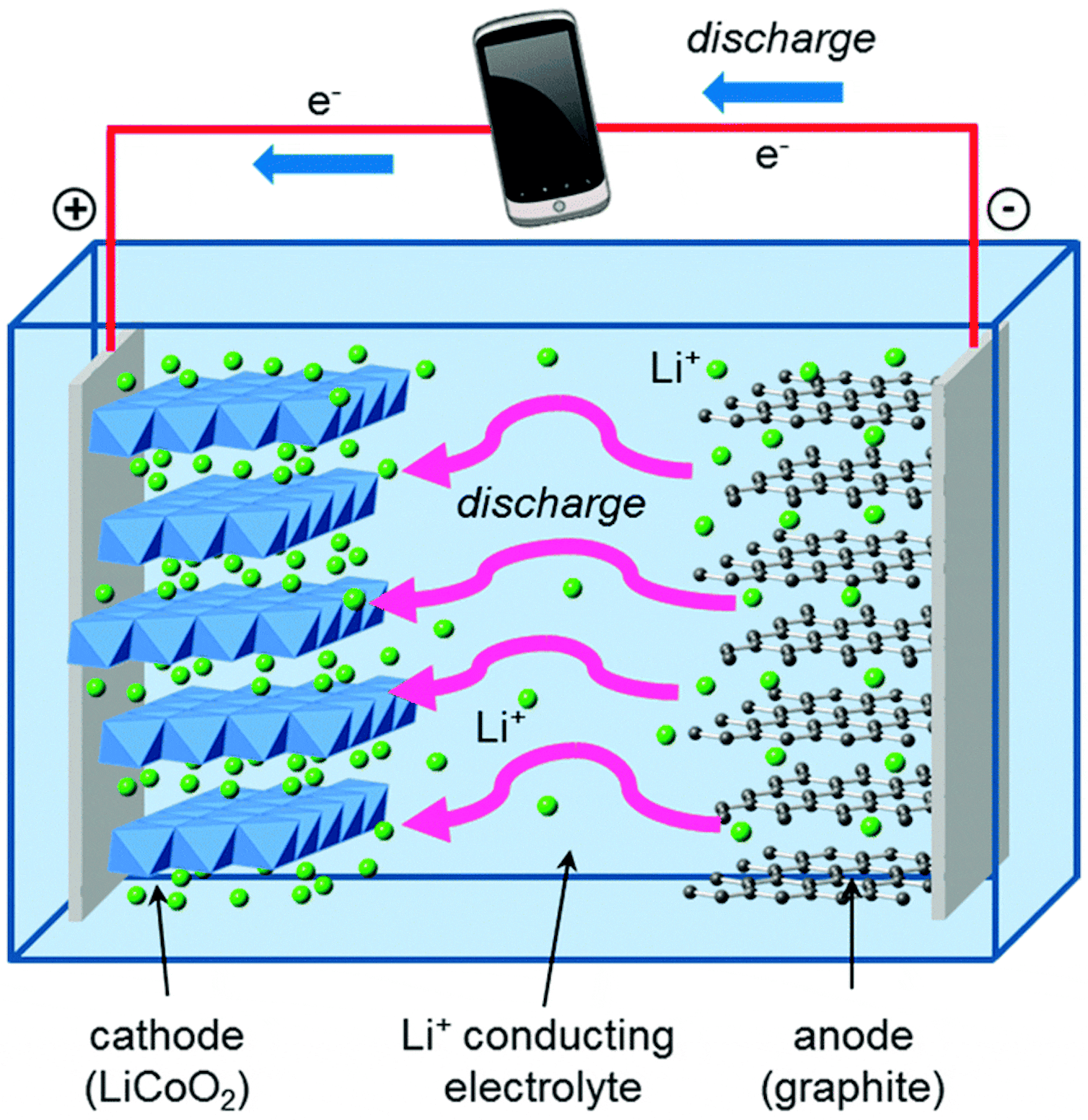
First things first, we need to understand what's happening to our batteries. Lithium-ion batteries work by moving lithium ions between the anode and cathode. Over time, this process causes wear and tear, leading to a phenomenon known as battery degradation. Think of it like a car engine â€" the more you use it, the more wear and tear it experiences.
Here's what happens:
- Capacity loss: The battery can't hold as much charge as it used to, meaning your device will need more frequent charging.
- Increased internal resistance: This makes the battery less efficient at transferring energy, slowing down your device and reducing its performance.
- Slower charging: It takes longer for the battery to reach a full charge.
- Reduced lifespan: The battery might become unusable sooner than expected.
Fight Back! Strategies for Maximizing Battery Life
Okay, so we've got the lowdown on battery degradation. But don't worry! We can fight back with some simple tips and tricks.
Storage Strategies
When you're not using your battery, proper storage is key! Think of it as giving your battery a relaxing vacation!
- Store at 40-50% charge: Don't let your battery sit at 0% or 100% for extended periods. Storing it at around half its capacity is ideal for long-term preservation.
- Cool and dry environment: Extreme temperatures can wreak havoc on batteries. Store them in a cool, dry place, away from direct sunlight or heat sources.
- Avoid long-term storage: If you're storing a device for an extended period, it's best to remove the battery and store it separately.
Charging Habits that Matter
Your charging habits have a huge impact on battery life. Here's how to charge like a pro:
- Avoid deep discharge: Don't let your battery drain completely before plugging in. Regular charging keeps the battery in a healthier state.
- Don't overcharge: Once the battery is fully charged, unplug it. Leaving it plugged in after it's full can stress the battery and reduce its lifespan.
- Use the right charger: Always use the charger that came with your device. Using a third-party charger can damage your battery or lead to overheating.
- Limit fast charging: While fast charging is convenient, it can put a strain on your battery. Opt for standard charging whenever possible.
Power Management & Optimization
Your device's settings play a crucial role in battery life. Take control of your device's power consumption with these tips:
- Turn off unnecessary features: Disable Bluetooth, Wi-Fi, and cellular data when not in use. These features drain battery power in the background.
- Reduce screen brightness: A dim screen can significantly extend battery life. Adjust brightness levels based on your environment.
- Close background apps: Apps running in the background consume battery power. Close them when not in use.
- Update your device software: Software updates often include battery optimization features that can improve performance and efficiency.
When All Else Fails: Battery Replacement
Even with the best care, batteries eventually reach the end of their lifespan. If your battery is showing signs of severe degradation, it's time to consider a replacement.
Here are some telltale signs that it's time for a new battery:
- Rapid battery drain: Your device loses charge quickly, even with minimal use.
- Slow performance: Your device feels sluggish, apps lag, and it takes a long time to boot up.
- Frequent overheating: Your device feels hot, even during normal use.
- Swollen battery: If the battery bulges or feels swollen, replace it immediately. It's a safety hazard.
When replacing a battery, always choose a genuine battery from a reputable source. Avoid cheap knock-offs, as they can be unreliable and potentially dangerous.
Beyond Batteries: Extended Device Life
Optimizing your battery is a great step towards keeping your devices running smoothly, but there's more to it than just the battery. Here are some extra tips for extending the life of your device:
- Keep your device clean: Dust, dirt, and grime can clog ports and vents, affecting performance. Regularly clean your device with a soft cloth.
- Protect your device: A sturdy case can safeguard your device from bumps and scratches, extending its lifespan.
- Avoid extreme temperatures: Just like batteries, devices can be affected by extreme heat and cold. Store them in a cool, dry place.
- Update your operating system: Regular updates can fix security vulnerabilities, improve performance, and optimize battery life.
Final Thoughts
We've covered a lot of ground, but the most important takeaway is this: taking care of your lithium-ion batteries is an investment in the longevity of your devices. By following these tips, you can not only extend the life of your batteries but also make your devices more efficient and reliable. So go ahead, put these strategies into practice, and enjoy your devices for years to come!
Now that you've learned how to optimize your batteries, you can rest assured that your devices will be ready to go whenever you need them. Happy tech-ing!
0 comments:
Post a Comment
Note: only a member of this blog may post a comment.